 University of North Texas

Automatic Email Archiving
Notice!
UNT System will begin enabling automatic email archiving starting March 1, 2026.
This initial phase focuses only on archiving. No mailbox limits or restrictions will be enforced at this time.
This initial phase focuses only on archiving. No mailbox limits or restrictions will be enforced at this time.
What This Means
Beginning March 1, 2026:
Faculty and Staff
- Email older than 1 year will automatically move to your Microsoft Online Archive mailbox.
Students
- Email older than 6 months will automatically move to your Microsoft Online Archive mailbox.
The Microsoft Online Archive is a separate cloud-based mailbox that stores older email so your primary mailbox does not fill up. It is different from the “Archive” folder inside Outlook.
Archived email:
- Remains fully searchable.
- Is accessible in Outlook, Outlook on the web, and mobile.
- Does not count against mailbox storage limits.
- Is not deleted as part of this change.
What the Experience Looks Like
You will see an additional mailbox labeled “Online Archive” appear below your primary
mailbox in Outlook. You can search across both mailboxes just as you do today.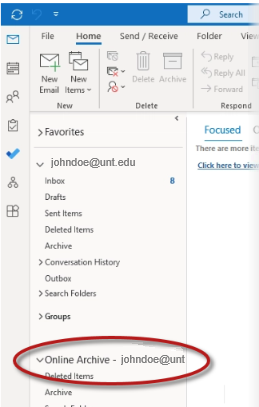
Shared Mailboxes & Other Questions
- Shared mailboxes will follow the same 1-year archiving rule.
- Permissions and delegated access are not affected.
- Archived mail is intended to remain in the Online Archive and cannot be moved back to the primary mailbox.
- This change does not alter retention policies, legal holds, or compliance controls.
I Need Help. Who Do I Contact?
Contact the UNT HelpDesk for further assistance.