 University of North Texas

Duo Mobile App Version
Starting March 31, 2026, Duo MFA (multi-factor authentication) PUSH will require Duo Mobile app version 4.85.0 or newer. This app version requires Android 12+ or iOS 16+. If you are unable to upgrade Duo Mobile to a newer version, you can use an alternative MFA method such as SMS text messages.
Which versions of iOS does Duo Mobile support? https://help.duo.com/s/article/1871?language=en_US
Which versions of Android does Duo Mobile support? https://help.duo.com/s/article/1872?language=en_US
How Do I Update My Duo Mobile App?
You can check for Duo Mobile app version updates through your mobile phone app store (Play Store on Android; App Store on iOS).
What Happens If I Cannot Update Duo?
If you cannot update Duo Mobile to version 4.85.0 or newer, you will have to use an alternative MFA method such as SMS text message, phone call, or Duo Passcode. When you login to a UNT system that requires MFA, you will see a menu of available options. Choose one of the available options (not Duo Push).
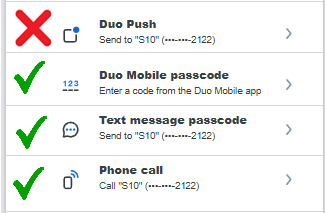
How Do I Get a Duo Mobile Passcode?
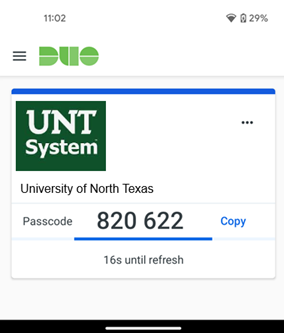
Open the Duo Mobile app on your phone (the older versions will still work for this) and click "Show" under UNT:
What If I Need to Access the VPN?
For VPN access, please see Append Mode to MFA to the VPN client using an alternative method.
I Need Help. Who Do I Contact?
Contact the UNT HelpDesk for further assistance.